Ads 468x60px

Popular Posts
-
http://who.is http://www.whois.net/ http://www.networksolutions.com/whois/index.jsp http://www.whois.sc/ http://www.internic.net/whois....
-
Cpanel Wordlist http://adf.ly/KeiF4
-
 download:- http://adf.ly/6aqx5 key:- http://adf.ly/6arGi
 -
So I found a really good website where you can stream, litterally almost every single movie on your mobile device, such as iPhone, Androi...
-
Waikato politicians are among the victims of a hacking group claiming to have taken over websites linked to the National Party in protest...
-
The Object-Oriented Thought Process - Weisfeld - Addison-Wesley (2009) download:- http://adf.ly/6ThKC
-
eKreyszig - Advanced Enginering Mathematics 9e B sorry for the dade link Now download:- http://adf.ly/6TjvD
-
link- http://adf.ly/Kejkv
-
1. Just visit there website- http://adf.ly/7HeOZ 2. Now you will see page asking you to choose your image and than entering that irrit...
-
Samsung hopes to woo developers away from Apple right in its backyard. The first-ever Samsung Developer Conference (SDC) will take place ...
Follow us!

Subscribe To


 Posts
Comments
Posts
Comments
About Me

How To Enable Windows Task Manager When Disabled By a Virus


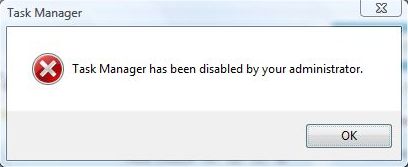
Let’s face it. All of us have been infected by virus before. Even if you have anti-virus installed, you can still be infected by a new or custom virus that is not recognized by your anti-virus. Sometimes after removing the virus completely from our system, you’ll face new problems such as you can no longer bring up Windows Task Manager from CTRL+ALT+DEL. You get the error message saying “Task Manager has been disabled by your administrator”. This post will help you to re-enable the Windows Task Manager as long as it cannot open normally. Just follow these steps.
Disabling Task Manager is one way viruses try to make it harder for you to deal with their infections. Before proceeding any further, you should run a complete and up-to-date anti-virus scan of your machine. It’s possible, perhaps even likely, that you’ve been infected.Once you come back virus-free, you can proceed with the fix. Usually when you try to run taskmgr.exe manually, you get this message:
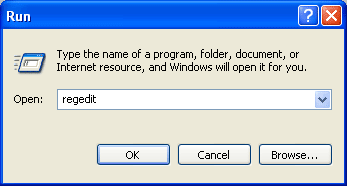
Once in the Group Policy Editor, expand in turn:
- User Configuration
- Administrative Templates
- System
- Ctrl+Alt+Del Options

Double click on Remove Task Manager to change its setting:

Click on Not Configured and then OK and Task Manager is available once again
Subscribe to:
Post Comments (Atom)
Social Icons


Popular Posts
-
http://who.is http://www.whois.net/ http://www.networksolutions.com/whois/index.jsp http://www.whois.sc/ http://www.internic.net/whois....
-
Cpanel Wordlist http://adf.ly/KeiF4
-
 download:- http://adf.ly/6aqx5 key:- http://adf.ly/6arGi
 -
So I found a really good website where you can stream, litterally almost every single movie on your mobile device, such as iPhone, Androi...
-
Waikato politicians are among the victims of a hacking group claiming to have taken over websites linked to the National Party in protest...
-
The Object-Oriented Thought Process - Weisfeld - Addison-Wesley (2009) download:- http://adf.ly/6ThKC
-
eKreyszig - Advanced Enginering Mathematics 9e B sorry for the dade link Now download:- http://adf.ly/6TjvD
-
link- http://adf.ly/Kejkv
-
1. Just visit there website- http://adf.ly/7HeOZ 2. Now you will see page asking you to choose your image and than entering that irrit...
-
Samsung hopes to woo developers away from Apple right in its backyard. The first-ever Samsung Developer Conference (SDC) will take place ...


0 comments:
Post a Comment